
Access rights and quotas#
This page describes who may write where, how much a user is allowed to hold, and how those figures are computed. It records the decisions behind the implementation, not only the fields to fill in.
The resources involved#
Five resources decide everything on this page. Three are stored, one is a plain configuration file, and the access right itself is computed rather than stored.
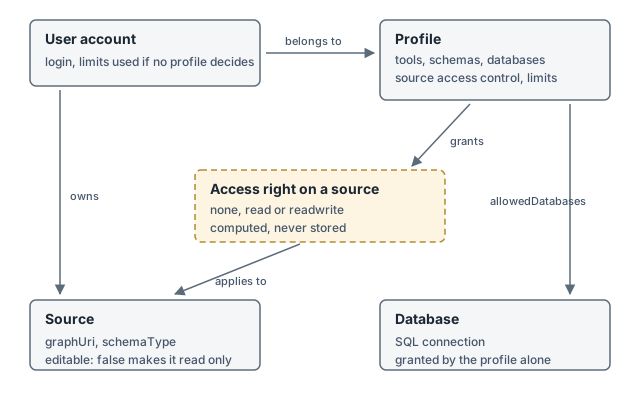
A user account belongs to the profiles listed on it and owns sources.
A profile grants tools, schema types, databases and source access to the accounts that belong to it, and carries every limit.
A source is a descriptor pointing at a named graph in the triplestore. Its
editableflag can make it read-only for everyone but the administrators.The access right on a source is derived from ownership, the profiles, the
editableflag and theadmingroup, every time it is needed. Nothing stores it, which is why changing a profile takes effect immediately.A database is an SQL connection the Mapping Modeler reads rows from. Access to it comes from the profile alone: no source points at a database, the tool is what brings the two together at import time.
User data entries belong to a user and are capped by their own limit. The same table also stores the technical records of the triple accounting, owned by the admin account so they never weigh on anybody’s allowance.
Access Rights and Quotas Matrix#
The columns are the five situations a user can be in for a given source. They are read
from left to right: being an administrator settles everything, then owning the source,
then what the profiles grant. The last column overrides all the others but the first: a
source declared with "editable": false in sources.json is read-only for everyone
except the administrators, its owner included.
Operation |
Administrator |
Owner of the source |
|
|
Source |
Quota |
|---|---|---|---|---|---|---|
Read a source (Lineage, KGquery, SPARQL |
yes |
yes |
yes |
yes |
yes |
none |
Mapping Modeler : write triples |
yes |
yes |
yes |
no |
no |
|
Mapping Modeler : delete triples |
yes |
yes |
yes |
no |
no |
none, it frees quota |
Graph Management : upload a graph |
yes |
yes |
yes |
no |
no |
|
Graph Management : delete or clear a graph |
yes |
yes |
yes |
no |
no |
none, it frees quota |
Graph Management : download a graph |
yes |
yes |
yes |
yes |
yes |
none |
SPARQL : update,insert |
yes |
yes |
yes |
no |
no |
none |
Mapping Modeler : N-Triples export |
yes |
yes |
yes |
yes |
yes |
|
Create a source |
yes |
not related |
depends on profile’s |
depends on profile’s |
not related |
|
Save a user data entry |
yes |
not related |
yes |
yes |
not related |
|
These two operations are not attached to a source, so the “owner of the source” and
editable: false columns do not apply, marked “not related”. They depend only on the
user’s own rights: readwrite/read cells report whether the profile grants the
underlying flag (allowSourceCreation for source creation; every profile can save user
data entries, subject only to the quota).
A few points the table cannot carry:
Administrators are exempt from all five limits, whatever the profiles say. The exemption tests the
admingroup explicitly, both for source creation/export and for the three triple and user data limits.A SPARQL
INSERTis subject to no triple quota. The proxy checks the write right per graph and stops there. Such triples belong to nobody, and the accounting explicitly refuses to charge triples nobody recorded, so they inflate no one’s usage.An export is capped per call, not per stock. Beyond the cap the export is truncated and carries a notice saying so, rather than being refused.
Deleting frees quota immediately, because the usage is measured against the store rather than accumulated in a counter.
All five limits,
maxNtExportTriplesincluded, are read from the profiles only.
Access rights on a source#
Three things decide whether a user may read or write a source.
The profiles. Each profile carries a sourcesAccessControl map whose keys are paths
of the form <schemaType>/<group>/<sourceName>, and whose values are read or
readwrite. A key is a prefix: OWL/FOLDER_1 covers every OWL source of that folder,
and the longest matching key wins. A user holding several profiles keeps the most
permissive result.
The ownership. A user always holds readwrite on the sources they own.
The editable flag of the source. A source declared with "editable": false in
sources.json is read-only for everyone but the administrators, whatever the profiles or
the ownership grant. This is the rule to use to protect reference ontologies such as BFO
that every profile needs to read and nobody should modify.
Administrators, meaning the admin login or any member of the admin group, hold every
right on every source, and are the only ones who may write a graph that no source
declares.
These three rules are settled in one place, SourceModel._getAllowedSources, which
attaches an accessControl value to each source of a user. Every consumer inherits from
it: the API routes that write, the SPARQL proxy that filters INSERT, DELETE, LOAD
and CLEAR per graph, and the tools that grey out what cannot be written.
A write route resolves the same accessControl value one of two ways. The Mapping
Modeler route (kg/triples.js) asks sourceModel.canWrite(user, {name}) directly and
answers 403 when the answer is no. The Graph Management routes (rdf/graph.js,
rdf/graphUrl.js) read accessControl off sourceModel.getUserSources(user) themselves
instead of calling canWrite, and answer 503 when it is not "readwrite". Both paths
resolve from the same _getAllowedSources data, so the access decision itself never
differs between them, only the status code returned on refusal.
The five limits#
Limit |
What it caps |
|---|---|
|
Whether the user may create a source at all |
|
How many sources the user may own |
|
Triples the user holds through the Mapping Modeler |
|
Triples the user holds through a graph upload |
|
User data entries the user owns |
They exist on the profile only, and are set from the Limitations drawer of a profile in the Config Editor.
maxNtExportTriples is a sixth limit of a different nature: it caps a single N-Triples
export rather than a stock, so there is nothing to accumulate against it.
How a limit is resolved#
A user may hold several profiles. When more than one sets the same limit, the most permissive wins: creation is allowed if any profile allows it, and the highest numeric cap is kept.
An administrator (the admin login or any member of the admin group) is exempt from
every limit, whatever the profiles say.
For anyone else, a limit left undefined by every profile of the user falls back to a
hard-coded default. A profile has to opt a non-admin user into the four 0 defaults
explicitly; leaving them unset blocks the Mapping Modeler write, the upload, saving user
data, and the N-Triples export respectively.
Default quotas#
The table below is defaultQuotaLimits. It lives in model/profiles.js, the value the
server actually enforces, mirrored by hand as an identically-named constant in
mainapp/src/Profile.ts, which the Config Editor reads to build its quota helper texts.
The two cannot share one module across the server/browser boundary, so changing a default
means editing both and keeping them equal.
Limit |
Default for a non-admin with no profile setting it |
Administrator |
|---|---|---|
|
|
|
|
|
unlimited |
|
|
unlimited |
|
|
unlimited |
|
|
unlimited |
|
|
unlimited |
An instance that never touches the Limitations drawer of any profile therefore starts locked down for everyone but the administrators: no source creation, no Mapping Modeler write, no upload, no user data, no N-Triples export. Each has to be opted into explicitly, per profile.
Zero is a value, not an absence: it forbids. This is why all five numeric fields
(maxNumberCreatedSource, maxWritableTriplesPerUser, maxUploadTriplesPerUser,
maxUserDataRecordsPerUser, maxNtExportTriples) are validated as nonnegative rather
than positive, so a profile can set 0 explicitly through the Config Editor, not just
inherit it as the implicit default. The resolution itself uses ?? and never ||, so an
explicit 0 is never mistaken for a missing value.
Counting the triples a user holds#
Nothing in the triplestore says who wrote a triple. Triples are inserted bare, an upload
loads an opaque file, and the response of an INSERT reports the volume submitted rather
than the volume stored. Virtuoso answers N (or less) triples -- done even when every
triple was already present. A user’s stock therefore cannot be recomputed by asking the
store who owns what.
What the store can answer is how big a bucket is, right now:
Mapping Modeler: the triples of a graph carrying
KGcreator#mappingFile "<table>", which is exactly the grain the deletion works at.Upload: everything else in the graph, that grain having no marker at all.
Beside each bucket we record, per user, the share they poured in, measured as the
difference between two live measurements taken around their write. Usage is the sum of
their shares, scaled down when the live measurement is smaller, which is what a deletion
looks like, whichever path it took, including a hand-written SPARQL DELETE that no
application hook could ever catch.
That scaling is written back into the shares as soon as it is observed. A share that still claimed more than the bucket holds would be a debt waiting to be revived: the next person writing into that bucket grows the live measurement, the scaling relaxes, and everyone’s usage climbs back to what it was before the deletion.
Consequences worth knowing:
Replaying a mapping someone else already ran measures a delta of zero, so it costs the second runner nothing. The store deduplicates; we observe it.
A deletion is charged to the contributors of the bucket in proportion to their shares, regardless of who deleted and of who had written the deleted triples. On a bucket with a single contributor, which is the common case, the figure is exact.
Emptying a bucket drops every share it held.
The upload bucket also collects what the Lineage tool writes, meaning axioms, relations and decorations, for want of a marker on those.
The share records live in the user_data table, owned by the admin account, which keeps
them out of every other user’s listing and out of reach of their deletions. They are read
and written directly rather than through userDataModel, whose listing is scoped to the
calling user and whose content may be stored outside the database.
How a limit is enforced#
Before the write. A route refuses with 403 and an explicit message when the user has
already reached the cap. A cap of 0 refuses without measuring anything.
During the write. An import cannot be judged beforehand: the rows are read by batches and the triples are produced and written as it goes, so the volume it will produce is unknown until it is produced. The route therefore hands the writer the triples still allowed, and the writer checks that budget before each batch. The overrun is bounded by one batch rather than by the size of the table, and the user is told the import was cut short.
The budget is spent with what each batch submits, which overstates the cost whenever the store already held those triples. When it looks exhausted it is refilled once from the live usage before giving up, so that replaying an existing mapping remains free.
After the write. The share is credited with the measured difference, never with the count reported by the triplestore.
What the user sees#
The Quotas tab of the user settings shows, for each limit that has a usage, what the user currently holds and the cap resolved for them. The triple figures are measured against the triplestore when the page is opened, so a deletion made outside the application is already taken into account.
Virtuoso load protection#
A profile may carry a maxVirtuosoLoad (0-100, the Max Virtuoso load (%) field of the
Config Editor). It is not a quota on a user’s stock: it is the load threshold above which
the heavy SPARQL and RDF endpoints of that profile’s users are refused with 429 while
the server is busy. It exists to shield the triplestore from a burst of expensive queries
(upload, drop or stream of a graph, metadata, graphUrl, shortestPath, the SPARQL proxy
and the YASGUI query).
How the threshold is resolved for a given user:
An administrator — the
adminlogin or any member of theadmingroup — is never capped, whatever the profiles say.Otherwise the highest
maxVirtuosoLoadamong the user’s profiles applies. When several profiles set it, the most permissive (the highest threshold) wins, mirroring how the other limits are resolved.When no profile of the user sets one, the global
config.metrics.virtuoso.maxLoadthreshold applies (see configuration-files).
A field left empty means “this profile does not set a threshold”, so the global value
applies. The estimated load behind the check is derived from the in-flight SPARQL requests
exposed by the virtuoso_sparql_load metric; the refusal happens as soon as that estimate
reaches the resolved threshold.